DNS Record Types Explained
How Does a Browser Know Where a Website Lives?
If we typed google.com into our browser and ever wondered:
“How does my browser know where this website actually lives?”
our computers do not understand names like google.com
They understand only numbers like 149.245.120.6
That’s where DNS needed .
What is DNS
DNS (Domain Name System) is the phonebook of the internet.
Humans remember names like example.com
Computers need IP addresses like 93.184.216.34
DNS connects the two.
Just like a phonebook maps a person’s name → phone number,
DNS maps a domain name → server IP address.
Without DNS, ww have to memorize numbers(IP’s) to visit websites
Need of DNS Records
DNS doesn’t store just one piece of information.
A website needs answers to many questions:
Where is the website hosted?
Where should emails go?
Who controls this domain?
Is this domain verified by Google or Microsoft?
Each answer is stored as a DNS record.
Think of DNS records as different sections in a contact card.
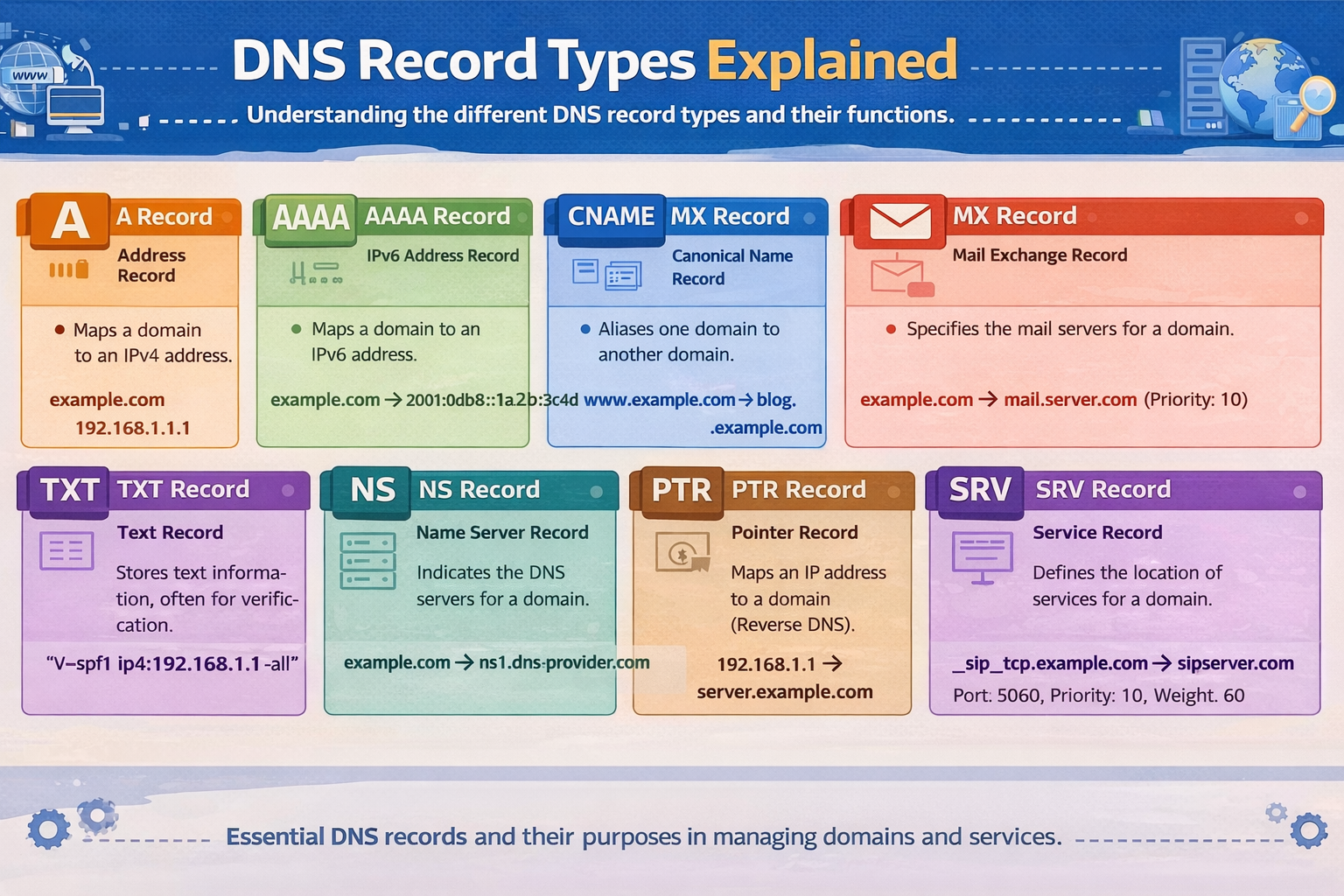
A Record
An A record maps:
Domain name → IPv4 address
Ex-:
google.com → 253.244.216.34
Domain name = house name
IP address = house street address
When a browser asks:
“Where is example.com?”
The A record gives the exact location.
NS Record
NS (Name Server) records answer this question:
“Who is responsible for this domain’s DNS?”
They tell the internet which DNS servers are allowed to give answers for the domain.
Imagine an apartment building:
The NS record tells you which building office manages this building
All other questions go to that office
Without NS records, no other DNS records would matter.
AAAA Record
An AAAA record does the same job as an A record ; but for IPv6.
Domain name → IPv6 address
Why both?
IPv4 addresses are running out
IPv6 provides a much larger address space
Many of the modern websites have both A and AAAA records ,and the browser chooses the best record.
CNAME Record
A CNAME (Canonical Name) record points one domain name to another domain name.
Ex-:
www.example.com → example.com
Think of mail forwarding:
- “If someone asks for www.example.com, send them to example.com”
Common confusion (gently cleared):
A record points to an IP
CNAME points to another name, not an IP
You never use both for the same name.
MX Record
MX (Mail Exchange) records answer:
“Where should emails for this domain be delivered?”
Ex-:
example.com → mail.google.com
Website traffic goes to your house
Emails go to your post office
Even if your website is hosted somewhere else, email can be handled by Google, Microsoft, or another provider.
NS records manage DNS
MX records manage email
They do very different jobs.
TXT Record
TXT records store text-based information.
They are commonly used for:
Domain ownership verification
Email security (SPF, DKIM, DMARC)
Service validation
A TXT record is like a note pinned to your door saying:
“Yes, Google is allowed to send emails for me.”
we usually don’t visit TXT records directly ; services read them in the background.
How All DNS Records Work Together
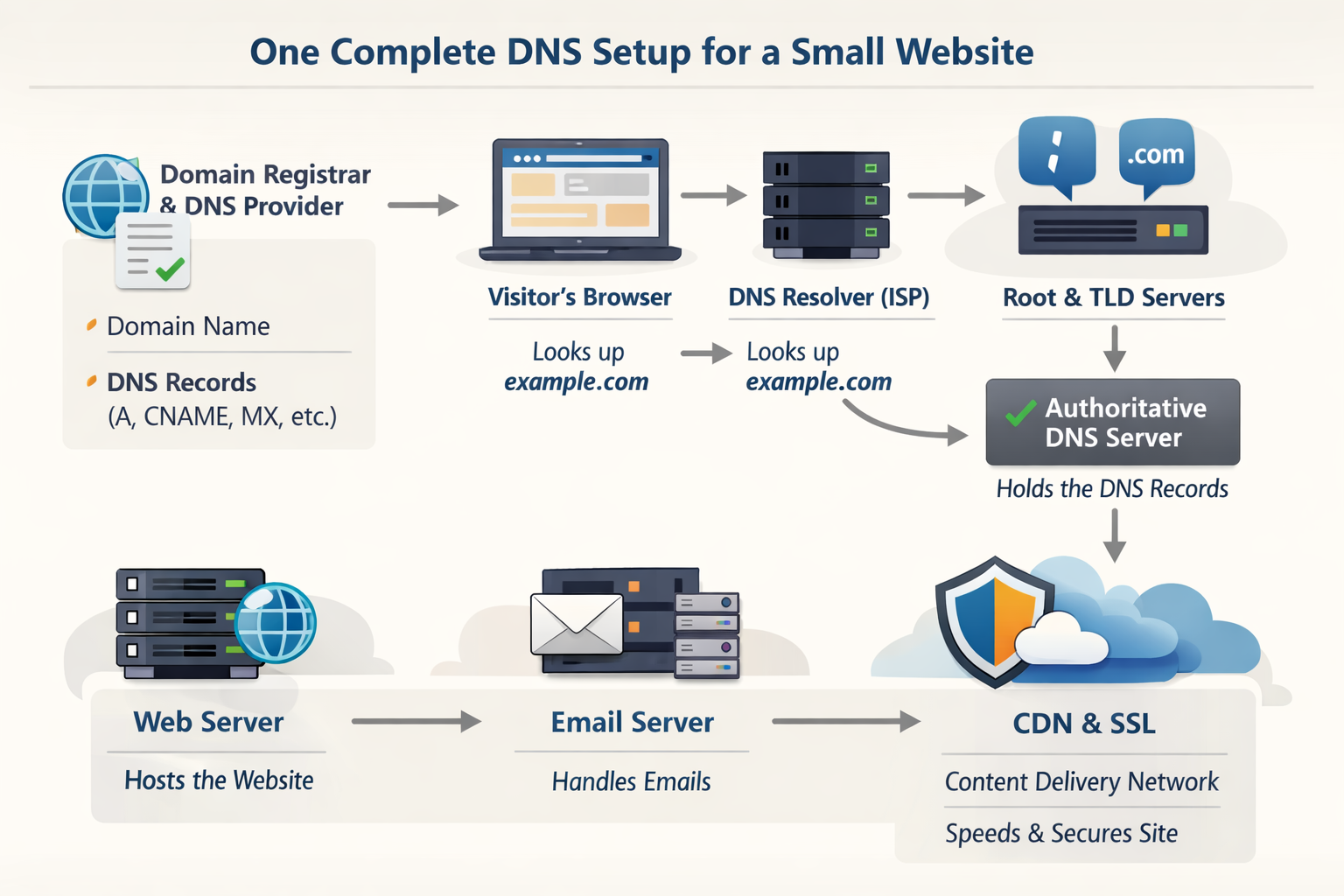
Let’s take a small website: xyz.com
Here’s what happens behind the scenes:
NS records say who controls xyz.com
A / AAAA records tell browsers where the website lives
CNAME records handle alternate names like www
MX records route emails correctly
TXT records prove ownership and improve security
Each record solves a different problem, but together they make the website work smoothly.
Big Picture: Browser → DNS → Server
High-level flow:
You type example.com
Browser asks DNS for help
DNS responds with the correct records
Browser connects to the server
Website loads
All of this happens in milliseconds.
Final Thoughts
DNS may sound complex at first, but at its heart, it’s just:
Names
Addresses
Responsibilities
Directions
Once you understand what problem each record solves, everything starts to click.
If the internet were a city, DNS would be its map, directory, and postal system all in one.


